
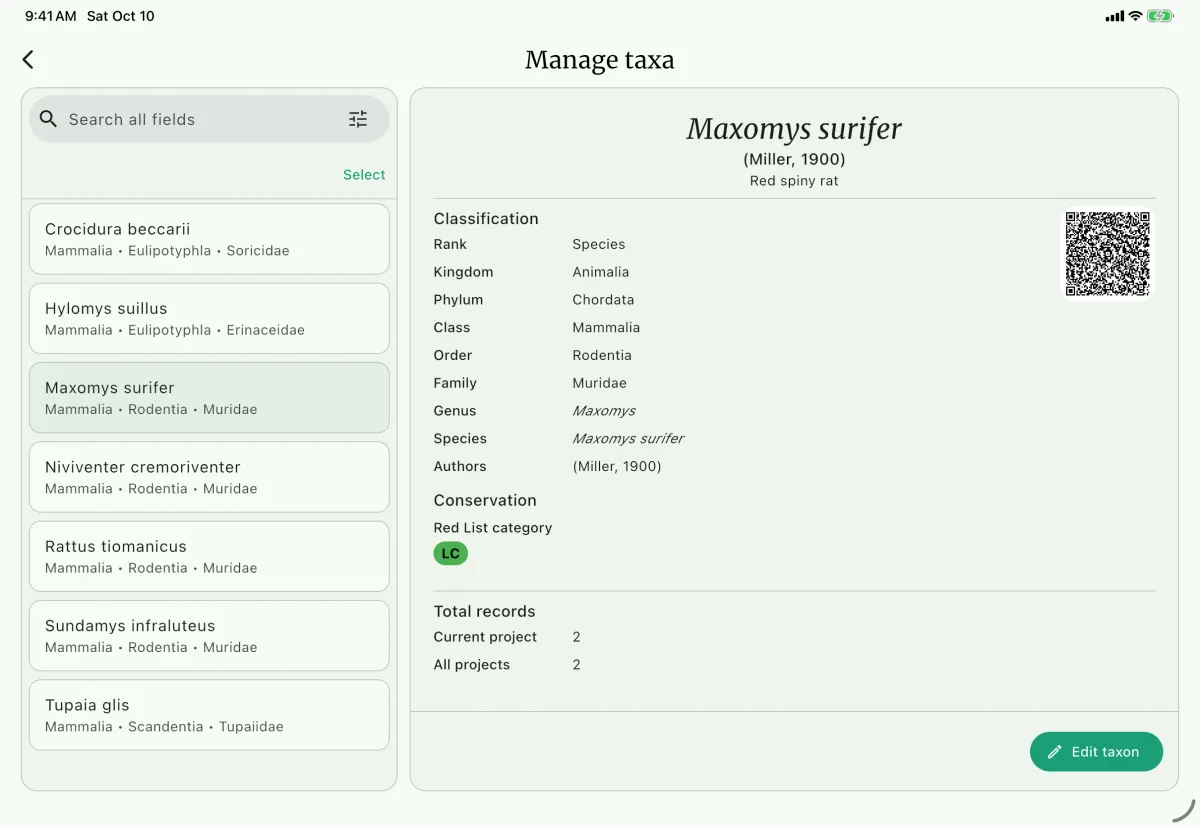
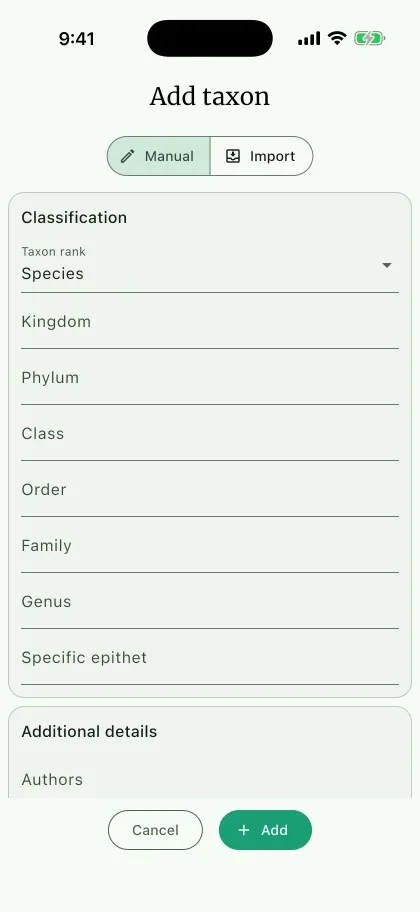
You can register a new taxon manually, import a file, or scan a NAHPU taxon QR code.
Importing a taxon adds registry data. It does not add a new specimen catalog group to the application. Contributors implementing a new group should follow Adding a taxon group.
Register a new taxon
Section titled “Register a new taxon”A registry entry does not have to be a species. Taxon rank sets the rank the record represents, and the form shows the name fields down to that rank:
- Class
- Order
- Family
- Genus
- Species
- Subspecies
Choosing Family, for example, shows Kingdom, Phylum, Class, Order, and Family, and leaves the lower ranks out. This lets you register a taxon that has not been identified to species, which is common for material still awaiting determination.
Required fields
Section titled “Required fields”- Taxon rank: the rank this record represents.
- The name field for that rank:
Familyfor a family-rank record,Specific epithetfor a species,Subspecific epithetfor a subspecies, and so on. The app will not save the record until both are filled in.
Classification fields
Section titled “Classification fields”- Kingdom and Phylum: always available, whatever the rank.
- Class, Order, Family, Genus, Specific epithet, and Subspecific epithet: shown when the selected rank reaches them. Epithets are stored in lowercase.
Additional details
Section titled “Additional details”- Authors: The author of the taxon and the year of the publication.
- Common name: The common name of the taxon.
- IUCN Red List category: The IUCN Red List status of the taxon.
- CITES status: The CITES status of the taxon.
- Country conservation status: The conservation status of the taxon in a specific country.
- Sorting order: Arbitrary order to sort the taxon. It is mostly used when you export the record. For example, you can use the phylogenetic order.
- Notes: Any additional information about the taxon.
Manual registration
Section titled “Manual registration”- Go to the project dashboard.
- At the taxon panel, select
Add taxonG, then choose theManualD mode. - Select the
Taxon rankF. - Fill in the taxon information.
Import from file
Section titled “Import from file ”- Prepare your import file. Preferred formats are
.xlsx,.csv, and.tsv. - Go to the project dashboard.
- At the taxon panel, select
Add taxon, then choose theImportE mode. - Use the
Select filebutton to add the file. The app will automatically map the columns to the correct fields. On a narrow screen, use theSetupandPreviewtabs to configure the import and review the detected rows.
Delimiter behavior:
.csvuses comma..tsvuses tab.- Excel files are parsed as spreadsheets.
- For other file types, NAHPU makes a best-effort parsing attempt.
- If a file extension is not recognized, auto-detect first tries Excel, comma, tab, and semicolon.
- If auto-detect still fails, enter a custom raw delimiter in the advanced parser override.
Recommended import template columns:
- Supported fields:
taxon rank,kingdom,phylum,class,order,family,genus,epithet,subspecific epithet,common name,notes. - Rank values are
class,order,family,genus,species, andsubspecies. Without a rank, class (mapped or selected), order, family, genus, and specific epithet must be complete. The rank isspecies, orsubspecieswhen a subspecific epithet is present. Otherwise add a rank. - Each row requires every classification field from class through its selected rank. A subspecies row, for example, requires class, order, family, genus, specific epithet, and subspecific epithet.
- Header matching is flexible, so aliases such as
taxonClass,taxonOrder,taxonFamily,specificEpithet,infraspecificEpithet,species,subspecies,vernacularName,iucnStatus, andappendixStatusare also accepted. - Columns the app does not recognize are left unmapped. Use the dropdown above each column to assign it, or leave it as
Ignore.
A file may omit Taxon rank, Kingdom, Phylum, and Class. If Class is not mapped, select the supported class shared by all rows in Select the class shared by all rows. NAHPU fills missing kingdom and phylum values for known classes and preserves supplied values. Without a rank, order, family, genus, and specific epithet must be complete; the rank is species, or subspecies when a subspecific epithet is present. For other classes, include Taxon rank, Kingdom, Phylum, Class, and every classification column through the selected rank, with values in every required cell. Files containing multiple classes need a Class column.
Delimiter controls and parsing details are under Advanced options, which opens automatically after a parsing error. Select Review taxa, check the preview, and import the selected taxa. Already registered taxa are disabled and never overwritten.
Import from QR
Section titled “Import from QR ”- Open a taxon in the
Taxon Registryand select its QR code B to display it for sharing. - On the receiving device, choose
Add taxon→Import→Scan QR. - Choose
Single taxonto open the preview after the first valid scan, orMultiple taxato keep scanning. The batch scanner shows the latest result and the number of taxa ready to import; selectDoneto review them. - Check the preview, select the taxa to keep, and confirm with the import button. Nothing is saved before confirmation.
Each distinct taxon is queued once. Already registered taxa cannot be selected and are never overwritten. Invalid or unrelated codes show an error while the camera remains open. Cancelling leaves the previous import unchanged; completing a QR session replaces the pending file or QR import.
QR imports preserve the classification, authors, common name, and conservation statuses carried by the code. A supported rank and its name are sufficient; higher classification may be absent. For older codes without a rank, NAHPU uses the deepest populated name field. QR imports do not require column mapping or class selection. Sorting order and notes are not carried by taxon QR codes.
Scanning uses the camera on Android, iOS, macOS, and supported web browsers. If camera access is denied, allow it in device settings and retry. QR-image files and pasted payloads are not supported; use file import where camera scanning is unavailable.