
Large screen
Small screen
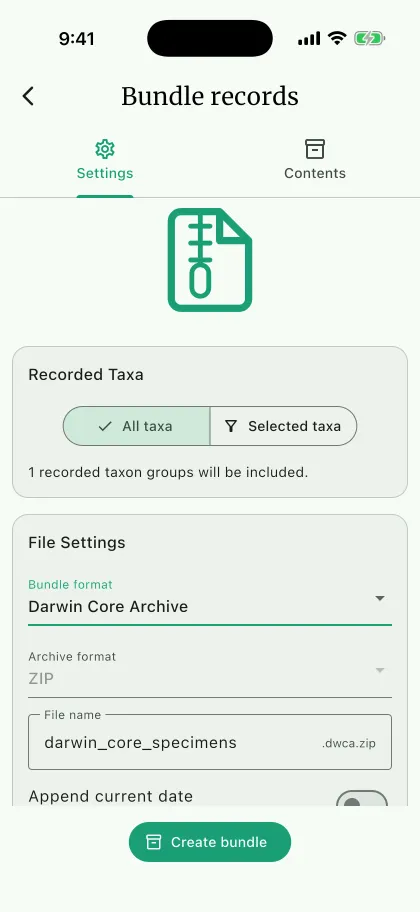
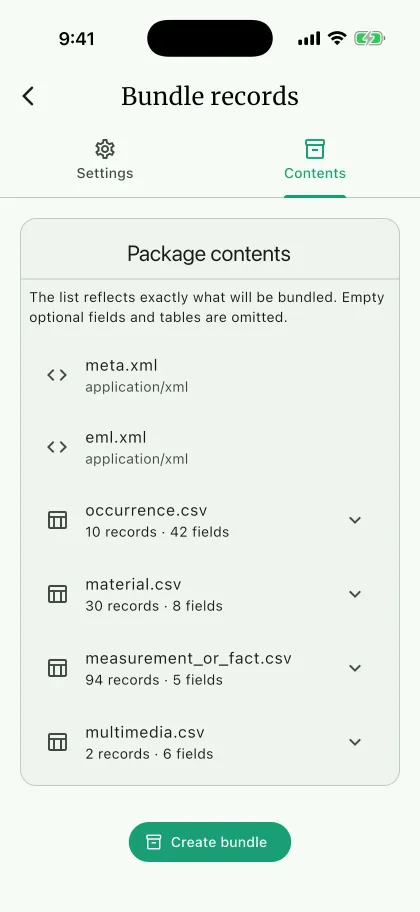
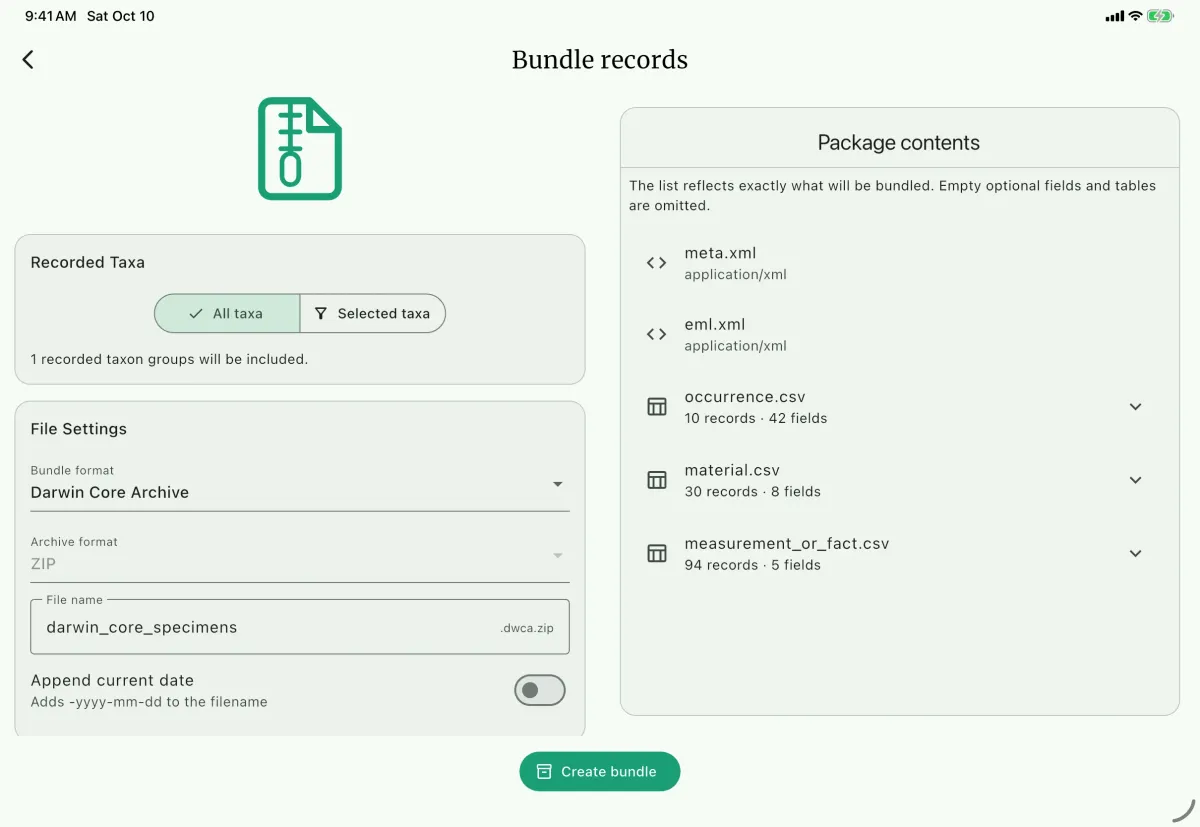
Use Bundle records to package related NAHPU data and files for exchange, publication, archiving, or reproducibility. The bundle screen previews the exact files and table fields before writing anything.
NAHPU provides three bundle types:
- Darwin Core Archive (DCA) for established biodiversity publishing systems that expect linear datasets, supported by most major collection management systems and biodiversity data aggregators.
- Darwin Core Data Package (DwC-DP) is the enhanced version of the Darwin Core Archive, packaged as relational Darwin Core data.
- NAHPU Data Package for a reproducible copy of the active project, includes the full project JSON, user configuration, and all related files. It is suitable for analysis in Python, R, and other Frictionless-compatible tools.
Create a bundle
Section titled “Create a bundle”- Navigate to the
Dashboardpage. - Open the project menu and select
Bundle records. - Select the
Bundle formatB. - Select the
Archive formatC when the chosen bundle supports more than one container.TAR.GZis the default for Data Packages.ZIPis available for tools and operating systems that prefer standard ZIP archives.- Darwin Core Archive always uses ZIP.
- For a Darwin Core bundle, choose
All taxaA orSelected taxa. Selecting Mammals also includes Bats. - Add a
File nameD and select the destinationDirectory. - Review
Package contentsE. Expand a CSV resource F to see its exported fields. - Review any warnings, especially missing media or a DwC-DP ZIP compatibility notice.
- Click
Create bundleG.
Choose an archive container
Section titled “Choose an archive container”TAR.GZ
Section titled “TAR.GZ”TAR.GZ first combines package files into a tar archive and then compresses that stream with gzip. It is the default for Darwin Core Data Packages and NAHPU Data Packages.
Typical file names are:
specimens.dwc-dp.tar.gznahpu-data.nahpu-dp.tar.gz
After extraction, datapackage.json and any package-specific metadata are at the root of the extracted package.
ZIP stores and compresses multiple files in one widely supported archive. NAHPU Data Package supports ZIP as a normal container. Darwin Core Data Package supports ZIP as a compatibility option, but TAR.GZ is the standards-oriented choice under the current DwC-DP compression guidance.
Darwin Core Archive always uses ZIP because ZIP is part of its normal exchange workflow.
Deep dive
Section titled “Deep dive”Darwin Core Archive
Section titled “Darwin Core Archive”A Darwin Core Archive is a specimen-focused exchange package based on the Darwin Core Text Guidelines.
The selected taxon groups determine the specimen occurrences in the archive. NAHPU then follows relationships from those specimens to include available:
- collecting events;
- specimen parts and other material entities;
- measurements;
- media;
- collectors, catalogers, preparators, and media creators.
Empty optional fields and empty extension tables are omitted.
Field coverage
Section titled “Field coverage”A bundle column is written only when the value has an exact, registered Darwin Core, Dublin Core, or Audubon Core term. Fields without one are not written to a Darwin Core bundle at all. Export a NAHPU Data Package when a workflow needs every recorded value. Package contents lists any fields that were withheld before you export.
Root files
Section titled “Root files”- meta.xml
- eml.xml
- occurrence.csv
- material.csv
- measurement_or_fact.csv
- multimedia.csv
Directorymedia/
- …
Only files supported by the selected data are written.
meta.xml describes the occurrence core and extension files, their column positions, and their Darwin Core term identifiers. eml.xml contains dataset-level metadata. occurrence.csv is always the core table.
Relationships
Section titled “Relationships”Extension records reference the occurrence core. For example:
- a specimen part becomes a material record linked by occurrence identifier;
- measurements become MeasurementOrFact records;
- media rows reference both the occurrence and the packaged media path.
Output
Section titled “Output”Darwin Core Archive produces:
<file-name>.dwca.zipChoose this format when the receiving repository, collection-management system, or publishing workflow explicitly expects a Darwin Core Archive.
Darwin Core Data Package
Section titled “Darwin Core Data Package”A Darwin Core Data Package, or DwC-DP, represents Darwin Core data as related tables under the Darwin Core Data Package specification. It also follows the Frictionless Data Package model.
Root files
Section titled “Root files”- datapackage.json
- eml.xml
- occurrence.csv
- identification.csv
- event.csv
- material.csv
- occurrence-assertion.csv
- media.csv
- agent.csv
- occurrence-agent-role.csv
- event-agent-role.csv
- material-agent-role.csv
- media-agent-role.csv
- occurrence-media.csv
Directorymedia/
- …
Optional tables appear only when data exists.
Descriptor
Section titled “Descriptor”datapackage.json identifies the versioned DwC-DP profile and describes:
- every CSV resource;
- CSV media type and format;
- ordered field descriptors;
- primary keys;
- foreign keys;
- relationship predicates.
DwC-DP uses a normalized relational model. Internal primary and foreign key columns preserve links even where the original human-readable identifier is also retained.
Data mapping
Section titled “Data mapping”NAHPU maps the selected specimen data into concepts such as:
occurrencefor the specimen occurrence;identificationfor the determination and its taxonomic ranks;eventfor collecting activity and location context;materialfor specimen parts;occurrence-assertionfor measurements;agentand role tables for people and their roles;mediaandoccurrence-mediafor media metadata and relationships.
DwC-DP is relational, so a value is written to the class the standard puts it in rather than repeated on the occurrence row. Taxonomic ranks are in identification, location and collecting values are in event, and catalog and preparation values are in material. A value with no class column, such as the host association, becomes an assertion. _pk and _fk columns are structural keys that version the identifier term they stand for.
The same field-coverage rule applies as for the Archive: only exact, registered terms are written. Original DDM, DMS, or UTM text is preserved in verbatim-coordinate terms, positive capture extent is added to coordinate uncertainty, selected weight units are retained, and agent identifiers prefer canonical ORCID URLs with NAHPU UUIDs as fallback.
For invertebrates, sex, life stage, caste, the host association, and specimen remarks are occurrence terms. Host part and the optional morphometrics — head width, body length, and upper and lower wingspan — are MeasurementOrFact records in millimetres. Canopy cover and the environmental parameters are assertions on the collecting event rather than on the specimen, with defined units including °C, %, mg/L, m/s, mm, and okta.
Archive options
Section titled “Archive options”TAR.GZproduces<file-name>.dwc-dp.tar.gzand is the default.ZIPproduces<file-name>.dwc-dp.zipfor compatibility.
When ZIP is selected, NAHPU shows a warning because the current DwC-DP guide specifies gzip for whole-package compression.
Choose DwC-DP when the recipient supports Frictionless descriptors and needs explicit table schemas and relational links.
NAHPU Data Package
Section titled “NAHPU Data Package”NAHPU Data Package is NAHPU's reproducibility and complete-data exchange format. It is a Frictionless Data Package with additional NAHPU metadata.
Unlike the Darwin Core formats, it is not restricted to selected specimen taxa. It includes the same complete active-project JSON used by Export project, matching tabular resources, and related files.
Its typed, relational CSV resources, enum mappings, and controlled-vocabulary snapshots make it suitable for downstream analysis in Python, R, and other Frictionless-compatible tools. Use Darwin Core Data Package instead when a workflow requires standardized Darwin Core tables and terms.
It is the only NAHPU bundle that preserves custom fields with no Darwin Core term, so it is the format to choose when nothing may be lost.
The package describes only the tables the project populated. A mammals-only project carries no bird, herpetofauna, invertebrate, or fossil resources, and mappings/sqlite_enums.csv lists only the enum columns of the tables that are present.
Root layout
Section titled “Root layout”- datapackage.json
- nahpu.toml
- nahpu-project.json
Directorytables/
- project.csv
- ...
Directoryconfigs/
- user_configs.json
Directorymappings/
- sqlite_enums.csv
Directoryvocabularies/
- site.csv
- events.csv
- specimens.csv
- parasites.csv
Directoryfiles/
- ...
Directorymedia/
- ...
project.csv and every other database table containing records are included. Empty project tables are omitted from both tables/ and datapackage.json, so the exact list varies with the project. Metadata resources, including enum mappings and controlled-vocabulary CSVs, remain present even when they have no rows.
Project JSON
Section titled “Project JSON”nahpu-project.json is the same versioned payload produced by a full Export project operation. It contains the active project, related records, media manifest, export metadata, and warnings. It preserves distinctions such as a null value versus an intentionally empty string without requiring SQLite.
The CSV files are open, tool-independent representations for inspection, analysis, and Frictionless-compatible processing. Their records are generated from the same payload so the JSON and tables remain scoped consistently. Empty collections remain in nahpu-project.json for project transfer even when no corresponding CSV resource is exported.
SQLite enum mappings
Section titled “SQLite enum mappings”mappings/sqlite_enums.csv explains integer values that NAHPU stores as enum indexes. Each row includes:
- the SQLite table and column;
- the Dart enum type or logical indexed type;
- the zero-based SQLite integer;
- the stable enum name used in code;
- the human-readable name shown in NAHPU.
Table and column context are included because more than one record type can use an enum with the same short name but a different value order. The mapping covers specimen sex and identification confidence, mammal age and reproductive fields, avian reproductive and molt fields, herpetofauna age, and echolocation categories. Boolean integers and numeric measurements are not enum indexes and are therefore not listed.
The mapping file also includes the invertebrate sex enum. Specimen-sex rows use explicit stable codes rather than deriving codes from enum order; legacy codes 0, 1, and 2 retain their original meanings. The mapping remains available even when the corresponding project table is empty and therefore omitted.
Controlled vocabularies
Section titled “Controlled vocabularies”The package snapshots the current user-controlled type names from NAHPU Settings into four CSV resources:
vocabularies/site.csvcontains site types and habitat types;vocabularies/events.csvcontains collecting methods and collecting personnel roles;vocabularies/specimens.csvcontains specimen types, treatments, conditions, and the enabled restricted specimen-sex vocabulary.vocabularies/parasites.csvcontains parasite categories, detection and preparation methods, anatomical locations, storage, and treatments.
Each row records the user configuration key, vocabulary name, zero-based list position, and configured value. If a setting has not yet been customized, the CSV contains the NAHPU default vocabulary that applies at export time. These files make the labels referenced by table records directly available to CSV and Frictionless tools without requiring them to parse the full configuration document.
Frictionless descriptor
Section titled “Frictionless descriptor”datapackage.json uses the standard data-package profile. Each populated project table is a tabular-data-resource with:
- column order;
- field data types;
- required-field constraints;
- primary keys;
- foreign-key references;
- UTF-8 CSV encoding.
The descriptor also declares the enum mapping and four controlled-vocabulary CSVs as tabular resources with field schemas and composite primary keys. It lists the project JSON, user configuration, manifest, and packaged user files as non-tabular resources.
Analyze with Frictionless
Section titled “Analyze with Frictionless”Extract the ZIP or TAR.GZ archive before loading datapackage.json, because the descriptor uses paths relative to the package root. Since empty project tables are omitted, inspect or test the resource names before reading an optional table.
Python users can install the Frictionless Framework and read the specimen table when it is available:
from collections import Counter
from frictionless import Package
package = Package("/path/to/extracted-package/datapackage.json")print(package.resource_names)
if package.has_resource("specimen"):    specimens = package.get_resource("specimen").read_rows()    counts = Counter(row["taxonGroup"] or "Unspecified" for row in specimens)    print(counts)
R users can install the frictionless package and perform the same inspection and summary:
library(frictionless)
package <- read_package("/path/to/extracted-package/datapackage.json")resource_names(package)
if ("specimen" %in% resource_names(package)) {  specimens <- read_resource(package, "specimen")  print(table(specimens$taxonGroup, useNA = "ifany"))}
Reproducibility manifest
Section titled “Reproducibility manifest”nahpu.toml records:
- package format name and version;
- export timestamp;
- application name, version, and build number;
- NAHPU database schema version;
- user configuration schema version;
- the number of exported tables;
- the enum-mapping and controlled-vocabulary resource paths and counts;
- the versions of the compiled
nahpu_apicrates, includingnahpu_dp,nahpu_dwc,nahpu_db, andnahpu_configs.
This metadata helps determine which version of NAHPU and its Rust components created the package.
User configuration
Section titled “User configuration”configs/user_configs.json contains the versioned NAHPU configuration export:
- general user configuration values;
- record export presets;
- document template presets;
- document layouts.
User files
Section titled “User files”When available, NAHPU includes:
- media referenced by the active project;
- photos for personnel referenced by the active project;
- custom user fonts.
Project media keeps the transfer-compatible paths below media/; custom fonts keep safe relative paths below files/. Missing files produce warnings and are not silently represented as successfully bundled content.
Archive options
Section titled “Archive options”TAR.GZproduces<file-name>.nahpu-dp.tar.gz.ZIPproduces<file-name>.nahpu-dp.zip.
The internal package contents are the same in both containers.
Bundle versus backup
Section titled “Bundle versus backup”Darwin Core bundles are exchange formats and are not restorable NAHPU backups.
Contributors extending bundle fields or taxon groups should read Export workflows and Adding a taxon group.
A NAHPU Data Package contains the full project-transfer payload and compatible media paths, so Merge project can open it directly. Its first purpose remains a documented, interoperable package. Continue using Backup database when a restorable copy of the complete NAHPU database is required.
Package validation and warnings
Section titled “Package validation and warnings”Before writing, NAHPU validates required data and package relationships. After writing, it reopens the archive and checks that required root metadata exists.
Warnings can include:
- linked media that no longer exists on the device;
- ZIP compatibility mode for DwC-DP.
A warning does not necessarily prevent export, but it should be reviewed before the package is shared or deposited.