
A site says where. A collecting event says when, how, and by whom: the dates a line ran, the traps on it, the people who worked it, and the weather. Specimens link to an event, not straight to a site, so the event is the bridge that gives each specimen its place, method, and collector.
On paper, this information is scattered. Trap counts are in the journal, the method is rewritten on every specimen form, and the people who checked the traps are not recorded at all.
1. Plan the events
Section titled “1. Plan the events”Each line ran once, so each site gets one event. The dates and trap counts come from the journal; nothing here is on the specimen forms.
| Site | Start | End | Method | Count | Event notes |
|---|---|---|---|---|---|
TJHH-L1 | 12 Sep 2014 | 16 Sep 2014 | Snap trap | 31 | One broken trap removed on 14 Sep. Rebaiting stopped on 15 Sep; some traps left baited. |
TJHH-P1 | 12 Sep 2014 | 16 Sep 2014 | Pitfall | 10 | About 50 m from camp, next to the Line 1 snap traps. |
TJBS-L2 | 12 Sep 2014 | 18 Sep 2014 | Snap trap | 25 | Most traps 1–2 m above the ground. |
TJHH-L3 | 16 Sep 2014 | 18 Sep 2014 | Snap trap | 20 | Checked by boat. |
TJHH-P4 | 16 Sep 2014 | 18 Sep 2014 | Pitfall | Leave empty | Number of pitfalls not recorded. Checked by boat. |
TJHH-L5 | 16 Sep 2014 | 18 Sep 2014 | Snap trap | 20 | Many traps set on lianas. Checked by boat. |
2. Create the first event
Section titled “2. Create the first event”Open Events and select
+.Choose the
Site IDTJHH-L1.Set
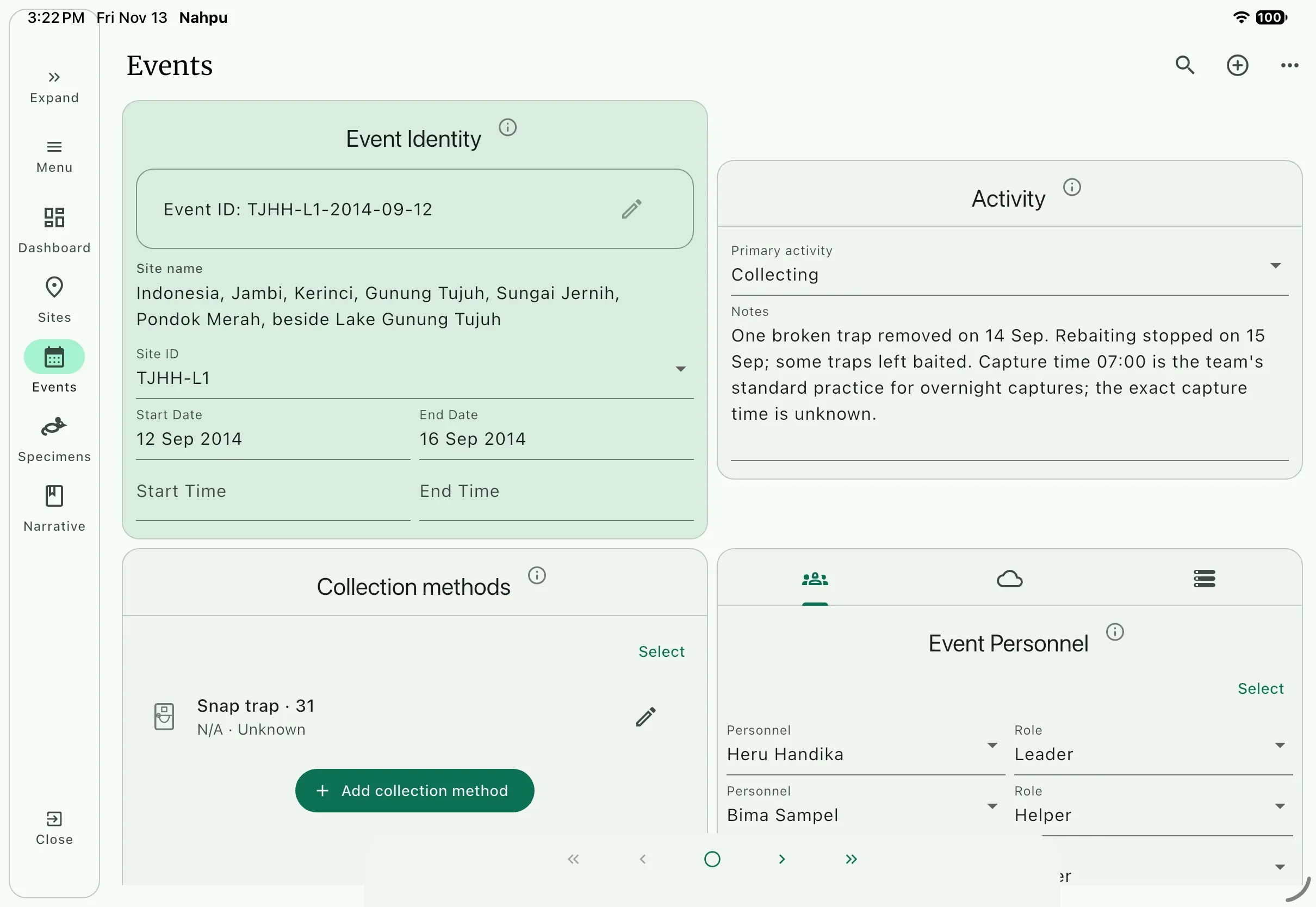
Start Dateto 12 September 2014 andEnd Dateto 16 September 2014. NAHPU builds theEvent IDfrom the Site ID and start date.Leave
Start TimeandEnd Timeempty. The journal does not say when the line was set or pulled, and an empty field is better than a guess.Set
Primary activitytoCollecting.In
Notes, enter the event notes from the table, then add the team's standard practice for capture times:Capture time 07:00 is the team's standard practice for overnight captures; the exact capture time is unknown.Snap traps and pitfalls were checked in the morning, and no one could tell when during the night an animal was caught. Recording 07:00 for every overnight capture was the team's standard practice. On paper that rule lived only in the team's heads; written into the event, it travels with every specimen linked to it, so no one mistakes 07:00 for a measured time.
3. Add the collection method
Section titled “3. Add the collection method”- Select
Add collection method. - Choose
Snap trapand setCountto31. - Leave
Brand and ModelandSizeempty; the paper does not give them.
This is where the paper's Line 1 problem goes away. TJHH-L1 has only snap traps and TJHH-P1 has only pitfalls. A specimen linked to TJHH-P1 can only have come from a pitfall, whatever its form says.
4. Add the people
Section titled “4. Add the people”On paper, Collector reads Heru Handika on every form. But on 17 September, Heru stayed in camp to prepare specimens while Bima, Citra, Dian, Eko, and Fajar took the boat to check the Pasir Putih lines. The event records who was there.
In
Settings>Events, add the personnel rolesLocal guideandBoat operator.LeaderandHelperare already in the list.Back in the event, open the personnel tab (people icon) and select
Add personnel.Add the people for this event:
Event People and roles TJHH-L1,TJHH-P1Heru Handika, Leader; Bima Sampel and Citra Contoh,Helper; Eko Pemandu,Local guideTJBS-L2Bima Sampel, Leader; Citra Contoh and Heru Handika,HelperTJHH-L3,TJHH-P4,TJHH-L5Heru Handika, Leader; Bima Sampel, Citra Contoh, and Dian Teladan,Helper; Eko Pemandu,Local guide; Fajar Nelayan,Boat operator
In Basic tutorial 5, each specimen's capture Collector is chosen from its event's people, so it can only name someone who was there.
The finished event for Line 1. NAHPU built the Event ID TJHH-L1-2014-09-12 from the Site ID and start date, and the times stay empty:
5. Add environmental data
Section titled “5. Add environmental data”The journal for 13 September gives the only weather for the trip: night temperatures from about 16 °C down to 14 °C, no rain, and a sky that was sometimes cloudy and sometimes very clear.
- In the
TJHH-L1event, open the environmental data tab (cloud icon). - Enter what the journal supports: the temperature range, no rain, and variable cloud cover. Put the date in the notes:
Night of 12–13 September. - Leave the other fields empty.
6. Create the other events
Section titled “6. Create the other events”- With
TJHH-L1open, chooseDuplicate eventfrom the three-dot menu. NAHPU copies the site, activity, notes, methods, and people, moves the dates forward one day, and gives the copy an empty environmental-data record. - Change the
Site IDtoTJHH-P1and set the dates back to 12–16 September. - Replace the collection method with
Pitfall, count10, and update the notes. - Create the remaining four events the same way, using the table in step 1 and the people in step 4.
What you gained over paper
Section titled “What you gained over paper”- Trap counts, dates, and setup details that were only in the journal are now attached to the line they describe.
- Each event has exactly one method, so pitfall and snap-trap captures cannot be confused.
- The guide, the boatman, and the teammates who checked traps are credited.
- Gaps, such as the unrecorded number of pitfalls on Line 4, are visible as empty fields.