
On paper, the survey name, the collector, and the species list live in the collector's head, or are written again on every form. In NAHPU you enter them once, before the first specimen, and every later record points to them.
You build:
- a project for the Mt. Tujuh survey;
- personnel for Heru and the team, with Heru as
Cataloger; - a taxon registry with one correct spelling for each name.
1. Create the project
Section titled “1. Create the project”On the home screen, select
Create project>Create new project.Enter the project information:
Field Value Project name Mt. Tujuh small mammals 2014Description Small-mammal survey of Mt. Tujuh, Kerinci, Jambi, 9–18 September 2014. Entered from the paper catalog of Heru Handika.Time zone Asia/JakartaJambi uses Western Indonesia Time (WIB), which is
Asia/Jakarta. The time zone documents the clock behind the recorded times, such as the trap-check times on the specimen forms. It does not change those times.Choose
Mammalogyas the main taxon format. It gives specimen forms the same measurements and reproductive fields as the paper form.Choose a personnel Field ID. Heru's forms number specimens with his initials and his own running number, so this mode reproduces
HH 436,HH 437, and so on.Complete the Cataloger details when asked (next section), review the summary, and select
Create project.
2. Add personnel
Section titled “2. Add personnel”Heru is the Cataloger: he numbered, prepared, and identified the specimens. His teammates helped set and check traps. The guide and the boatman do not appear anywhere on the paper catalog, although the 16–18 September work at Pasir Putih depended on them.
On the project dashboard, select
Add personnel>Add new.Add Heru:
Field Value Name*Heru HandikaRole CatalogerInitialsHHCataloger number*436The cataloger number is the next number NAHPU proposes. Setting it to
436makes the first new specimenHH436, the first number in this catalog. NAHPU then increases it by one for each new specimen. Because these tutorials skip numbers, you will override it in Basic tutorial 5.Add the other people. They do not catalog specimens, so give them the role
None:Name Their part in the survey Bima SampelSet and checked lines with Heru Citra ContohSet and checked lines Dian TeladanChecked the Pasir Putih lines Eko PemanduLocal guide Fajar NelayanFisherman who ran the boat to Pasir Putih Check that all six people appear on the dashboard.
The dashboard now shows the project and its people. Heru's cataloger number reads 530 here because the screenshot was taken after all seven specimens were entered.
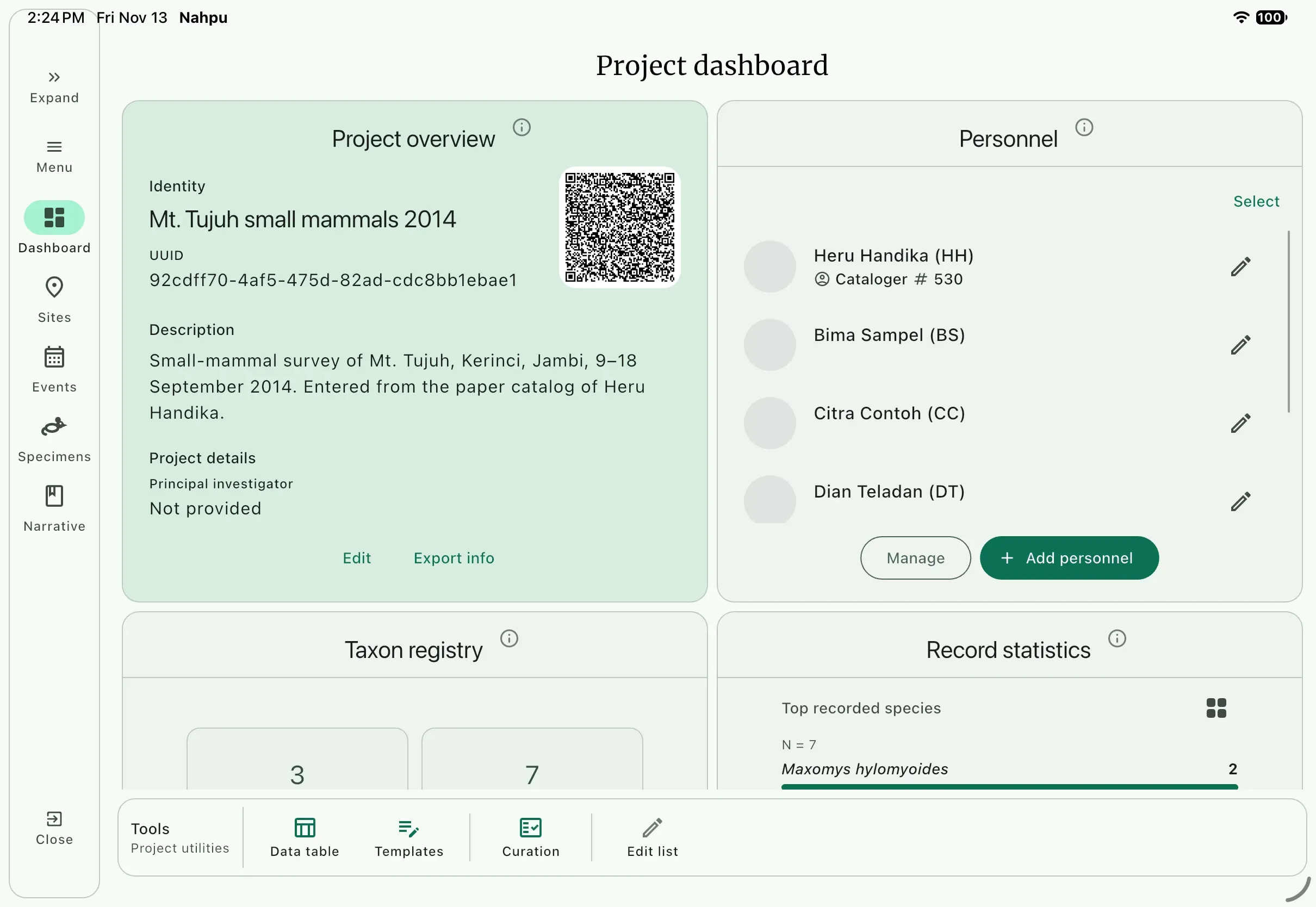
Roles such as leader, helper, guide, and boatman describe a person's part in one collecting event. You assign them in Basic tutorial 4.
3. Register the taxa
Section titled “3. Register the taxa”The paper catalog spells Maxomys hylomyoides at least five ways. A spreadsheet made from those forms would hold five "species". In NAHPU, a specimen's name is chosen from the taxon registry, so it can only be spelled the way the registry spells it.
Use the correct names, not the paper spellings:
| Paper spelling | Rank | Name to register | Order | Family |
|---|---|---|---|---|
Lariscur insignis, Larscur insignis | Species | Lariscus insignis | Rodentia | Sciuridae |
Mur crociduroider | Species | Mus crociduroides | Rodentia | Muridae |
Maxorys, Maxomy, Maxotys hylomyoider | Species | Maxomys hylomyoides | Rodentia | Muridae |
Maxomys cf. hylomyoider | Genus | Maxomys | Rodentia | Muridae |
Crocidura beccari, beccarii | Species | Crocidura beccarii | Eulipotyphla | Soricidae |
Crocidura neglecta | Species | Crocidura neglecta | Eulipotyphla | Soricidae |
All are in the class Mammalia.
- On the dashboard, find
Taxon registryand selectAdd taxon. - Stay on
Manualand choose theTaxon rank. - Fill in the name fields, from
Classdown toSpecific epithet. - Add a common name if you like, such as
Three-striped ground squirrelfor Lariscus insignis. - Repeat for each row, then check that the registry shows six entries.
The genus Maxomys is for HH 523, which Heru marked cf. hylomyoides: it resembles M. hylomyoides but he was not sure it is that species. Recording the genus keeps the identification at the level the evidence supports. Tutorial 5 puts the cf. note in the specimen's remarks.
What you gained over paper
Section titled “What you gained over paper”- The survey has a name, a description, and a declared time zone, so later readers know what the times mean.
- Everyone who worked on the survey is on record, including the local guide and the boatman.
- Each name has one spelling. Correcting a misspelled entry in the registry corrects it for every specimen that uses it.