
Darwin Core is the shared vocabulary that museum databases and portals such as GBIF use for specimen data. Turning a paper catalog into Darwin Core usually means retyping it into a spreadsheet, then fixing the spellings, units, dates, and missing localities by hand. Because you fixed those problems as you entered the data, NAHPU can build the archive from the linked records directly.
In this tutorial you review the seven specimens, explore their statistics, export them as a Darwin Core Archive, and read the result.
1. Review before you export
Section titled “1. Review before you export”Check the records against the paper one last time. Tutorials 3–5 removed most problems at entry; this review looks for the rest.
| Check | Where | What to look for |
|---|---|---|
| Field IDs | Specimens list | HH436, HH437, HH442, HH453, HH456, HH523, HH529, each once |
| Names | Each specimen | One spelling per name; Maxomys (genus) only for HH 523 |
| Places | Each specimen | Pondok Merah for HH 436–456; Pasir Putih for HH 523 and HH 529 |
| Methods | Each specimen | Pitfall for HH 453 and HH 529; Snap trap for the others |
| Explained choices | Remarks | HH 437, HH 442, HH 456, HH 523, and HH 529 say what was changed and why |
| Gaps | Sites and events | No coordinates for Pasir Putih; no pitfall count for Line 4 |
The gaps are not errors to fix before export. They are honest records of what the 2014 paper did not capture.
2. Explore the statistics
Section titled “2. Explore the statistics”Before you export, look at the data as a whole. Exploring the record statistics is a NAHPU best practice. It shows imbalance in what was collected, shows how consistently parts were sampled, and, in the field, helps you decide which parts to prioritize when supplies such as tubes or ethanol run low.
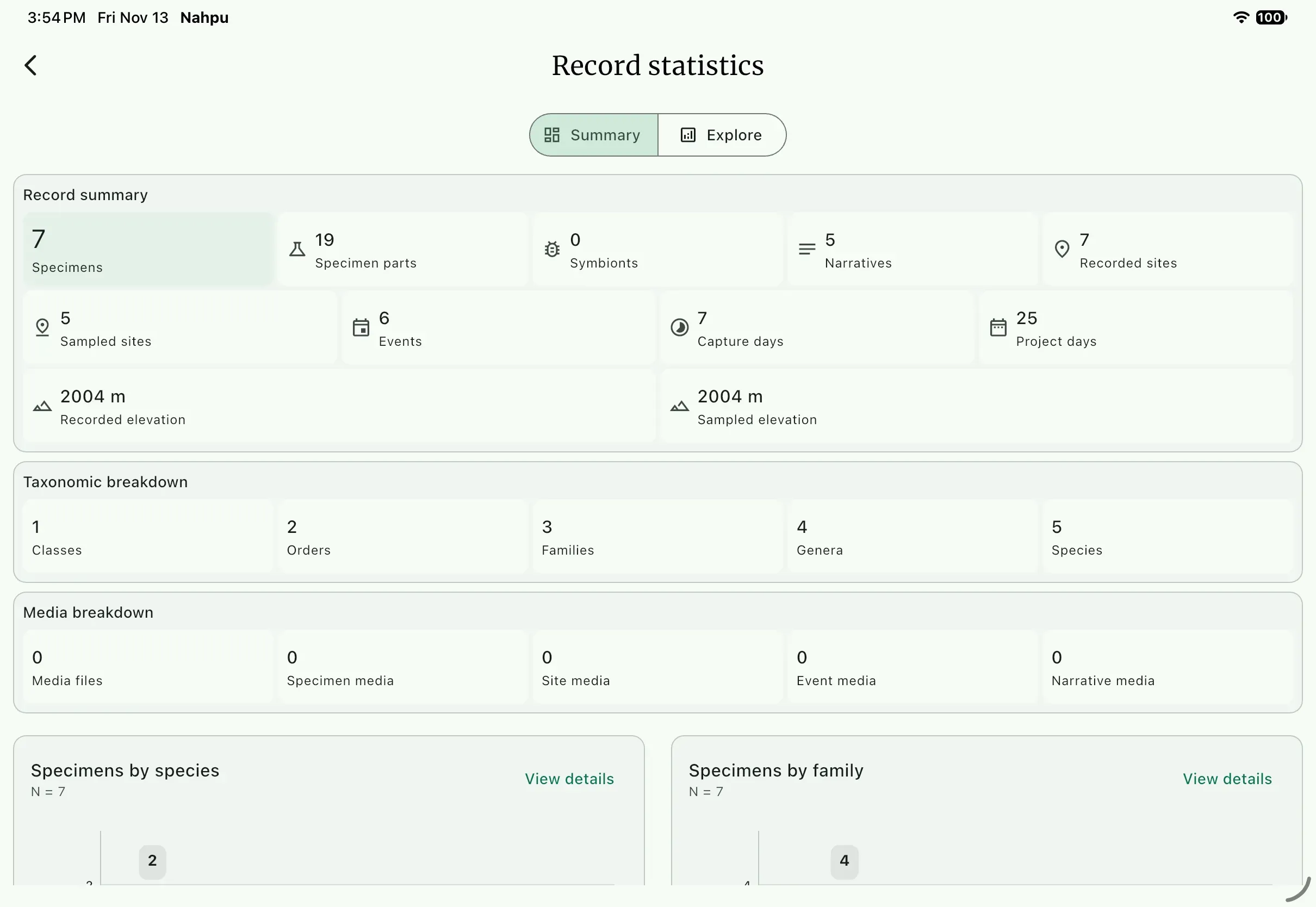
On the dashboard, open the Record statistics panel and select Explore more stats. The Summary view counts the whole project:
Check for imbalance
Section titled “Check for imbalance”Select Explore > Counts > Specimens. Group by Species, break down by Sex, and switch to Table:
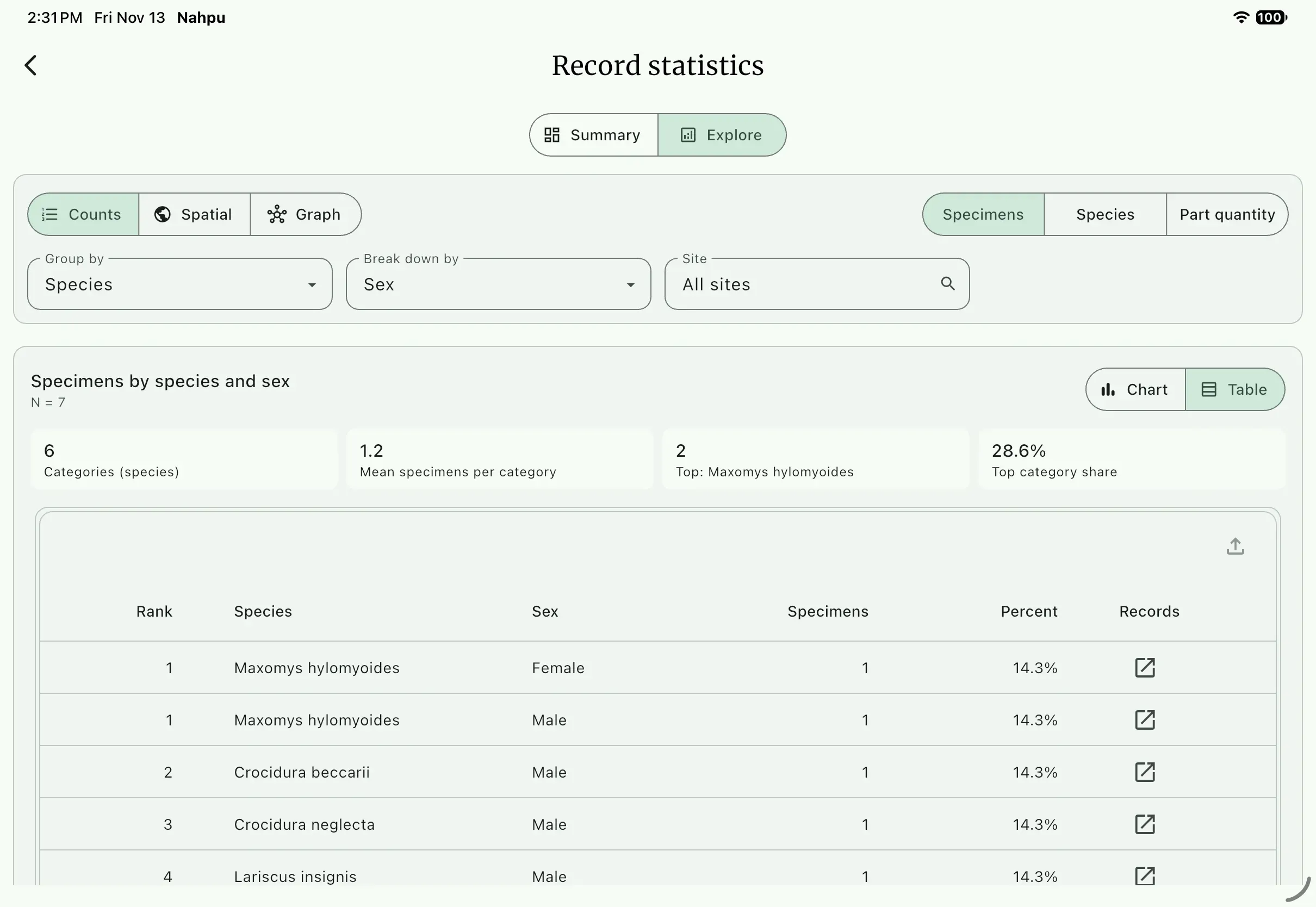
Five of the seven specimens are male, and Maxomys hylomyoides is the only species with both sexes. Seven hand-picked records are not a sample, so read this as a demonstration. With a full catalog, the same table shows whether a skew is real, for example from trap behavior or season, and whether to note it before analysis.
Check part sampling
Section titled “Check part sampling”Select Part quantity and group by Part type:
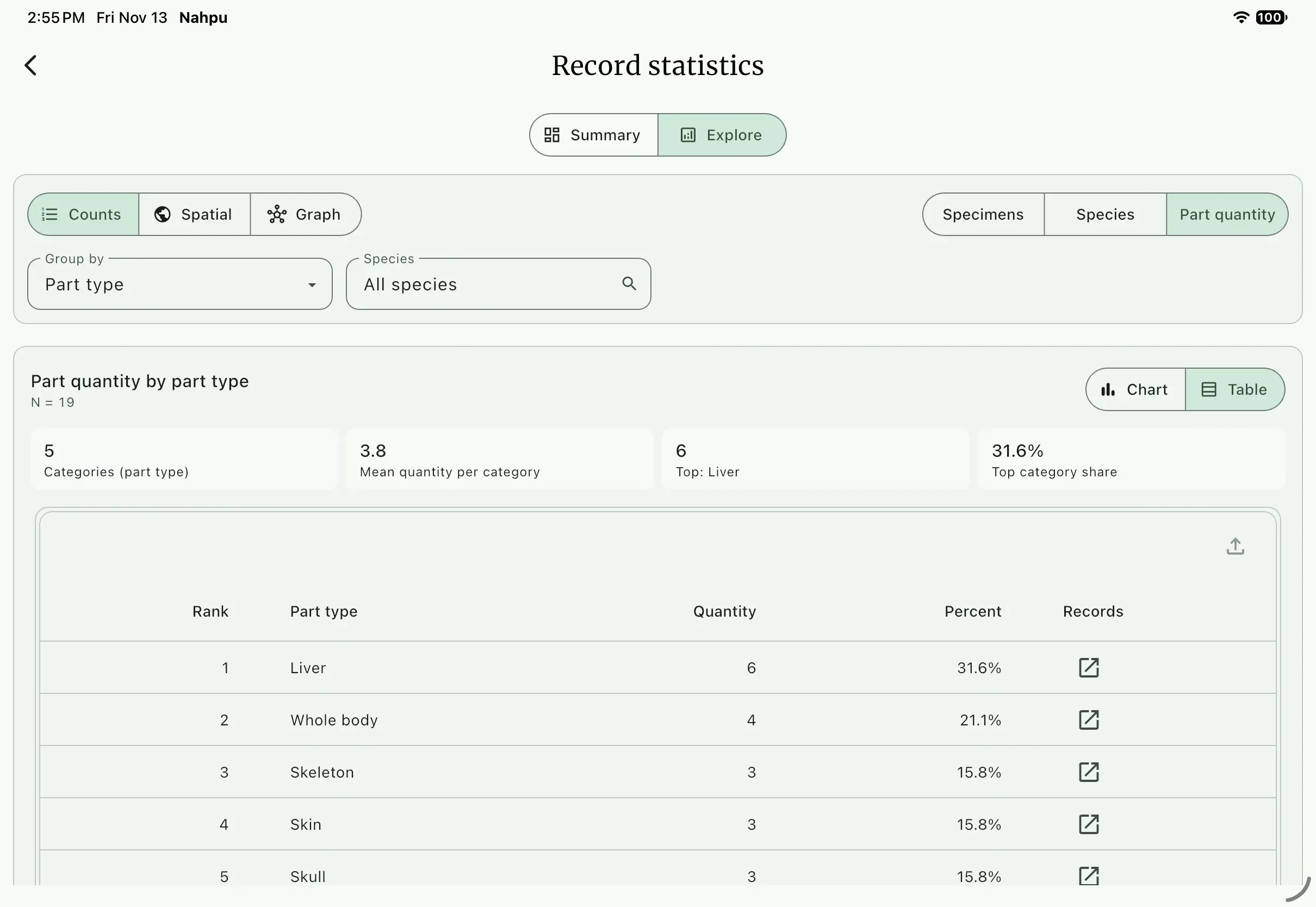
Six of the seven specimens have a liver tissue. The exception is HH 442, whose form has no tissue circled. During fieldwork, check this table at the end of each day: it shows whether every specimen got the parts your protocol requires, and which part types use the most tubes, ethanol, and formalin. When supplies run short, it helps you decide what to keep collecting.
Every table here has an Export table button for reports. See Export statistics.
Read the records in the Data table
Section titled “Read the records in the Data table”To see the records themselves, open Data table from Tools at the bottom of the dashboard. Choose what to show, such as Specimen records, Specimen parts, Sites, Events, or Narrative, then sort, search, or filter. This is the parts table for the seven specimens:
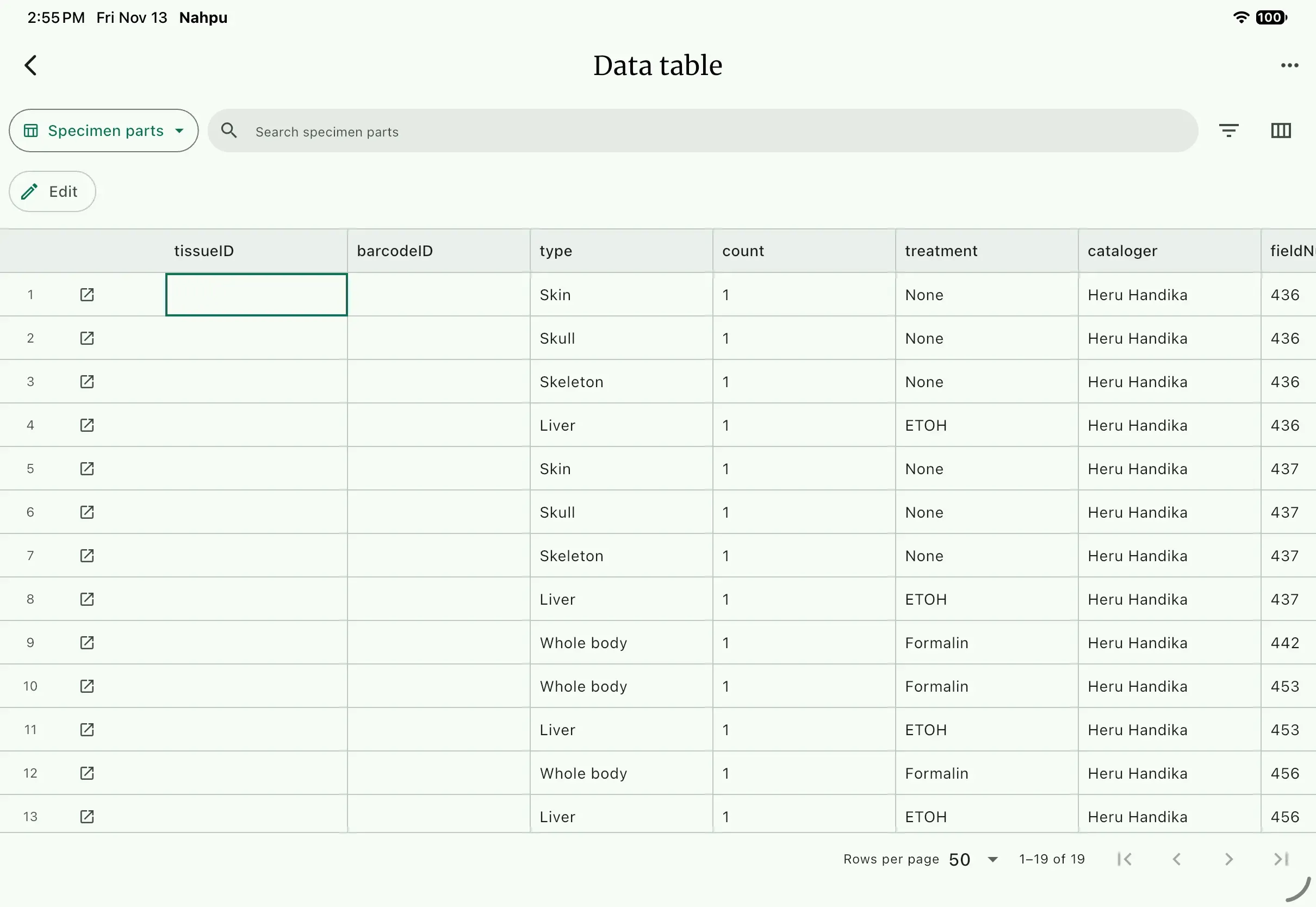
The Data table is a quick way to scan for gaps, such as a part with no treatment or a specimen with no tissue, without opening each record.
3. Create the archive
Section titled “3. Create the archive”- Open the
Dashboard, open the project menu, and selectBundle records. - Choose
Darwin Core Archiveas theBundle format. It always uses ZIP. - Choose
Selected taxaand select Mammals. - Enter the file name
mt-tujuh-2014and choose a directory. - Review
Package contents. Expandoccurrence.csvto see its fields. The list also shows any recorded fields that are withheld because they have no Darwin Core term. - Read any warnings, then select
Create bundle.
NAHPU writes mt-tujuh-2014.dwca.zip.
4. Read the archive
Section titled “4. Read the archive”Unzip the file. It contains:
- meta.xml
- eml.xml
- occurrence.csv
- material.csv
- measurement_or_fact.csv
occurrence.csv is the core table, with one row per specimen. The other tables hold parts and measurements and point back to their specimen. meta.xml describes the columns, and eml.xml holds the dataset metadata.
One specimen, one row
Section titled “One specimen, one row”This is part of the HH 436 row. Your UUID and Event ID will differ.
| Darwin Core term | Value | Where it came from |
|---|---|---|
occurrenceID | A UUID | Assigned by NAHPU when the record was created |
basisOfRecord | PreservedSpecimen | Specimen record |
catalogNumber | HH436 | Field ID |
eventID | The TJHH-L1 event | Event |
eventDate, eventTime | 2014-09-12, 16:00 | Specimen |
scientificName | Lariscus insignis | Taxon registry |
family | Sciuridae | Taxon registry |
country, stateProvince, county | Indonesia, Jambi, Kerinci | Site |
locality | Gunung Tujuh, Sungai Jernih, Pondok Merah, beside Lake Gunung Tujuh | Site |
decimalLatitude, decimalLongitude | -1.70274, 101.39032 | Site coordinate |
minimumElevationInMeters | 2004 | Site coordinate |
habitat | Type, condition, and description | Site |
recordedBy | Heru Handika | Event personnel |
identifiedBy | Heru Handika | Specimen |
sex, lifeStage | Male, Subadult | Specimen |
On paper, many of these values lived in a sheet header, the journal, or the collector's memory. Here each comes from the record that owns it: the site, the event, the taxon registry, or the people you entered once.
What the paper problems became
Section titled “What the paper problems became”| Paper | In the archive |
|---|---|
| Five spellings of Maxomys hylomyoides | One scientificName value |
01.70274° S, crossed-out feet | -1.70274; elevation in meters |
| Blank locality headers | Every row has its own locality |
| Pasir Putih filed under Pondok Merah | HH 523 and HH 529 have the Pasir Putih locality and no coordinates |
Line 1 for two methods | Pitfall and snap-trap captures have separate events |
| Heru as collector on every form | recordedBy names the person from the event |
SA and AL | Rows in material.csv with a type and treatment, such as Skull, Whole body in Formalin, or Liver in ETOH |
TTL 238, TL 84, … with no units | Rows in measurement_or_fact.csv with names and units, such as total length, 238, mm |
What you have done
Section titled “What you have done”Across the seven Basic tutorials you:
- read a paper catalog critically and listed its problems;
- created a project with its people and a clean taxon registry;
- turned one locality header into a camp and six line sites, and the journal's trap notes into six events;
- entered seven specimens, choosing the best-supported value where the paper disagreed with itself and explaining each choice;
- corrected and entered the field journal, linked to the camp where it was written;
- checked sample balance and part sampling with record statistics and the Data table;
- exported a standard Darwin Core Archive from the linked records.
Young Heru's catalog was better than most: it has standard measurements, trap lines, and a journal. NAHPU does not replace that care. It makes the links between place, time, method, people, and specimen part of the record, so they are not lost when the notebook is closed.
Where to go next
Section titled “Where to go next”- Export tutorials: build export presets, convert data packages, and print voucher tags.
- Bundle records: every bundle format, including the Darwin Core Data Package.
- Data management best practices.